Before the app can communicate with the API, create a new API key. The API handles authentication using a signed JSON
Web Token (JWT) which is passed in an HTTP header.
curl -X GET https://api.example.gr4vy.app/transactions \
  -H "authorization: bearer eyJhbGciOiJIUzI1NiIsInR5cCI6IkpXVCJ9.eyJzdWIi..."
Using an SDK is recommended. The SDKs make the process of generating a token a lot easier and are probably
available in the preferred programming language. This is covered in the
next step.
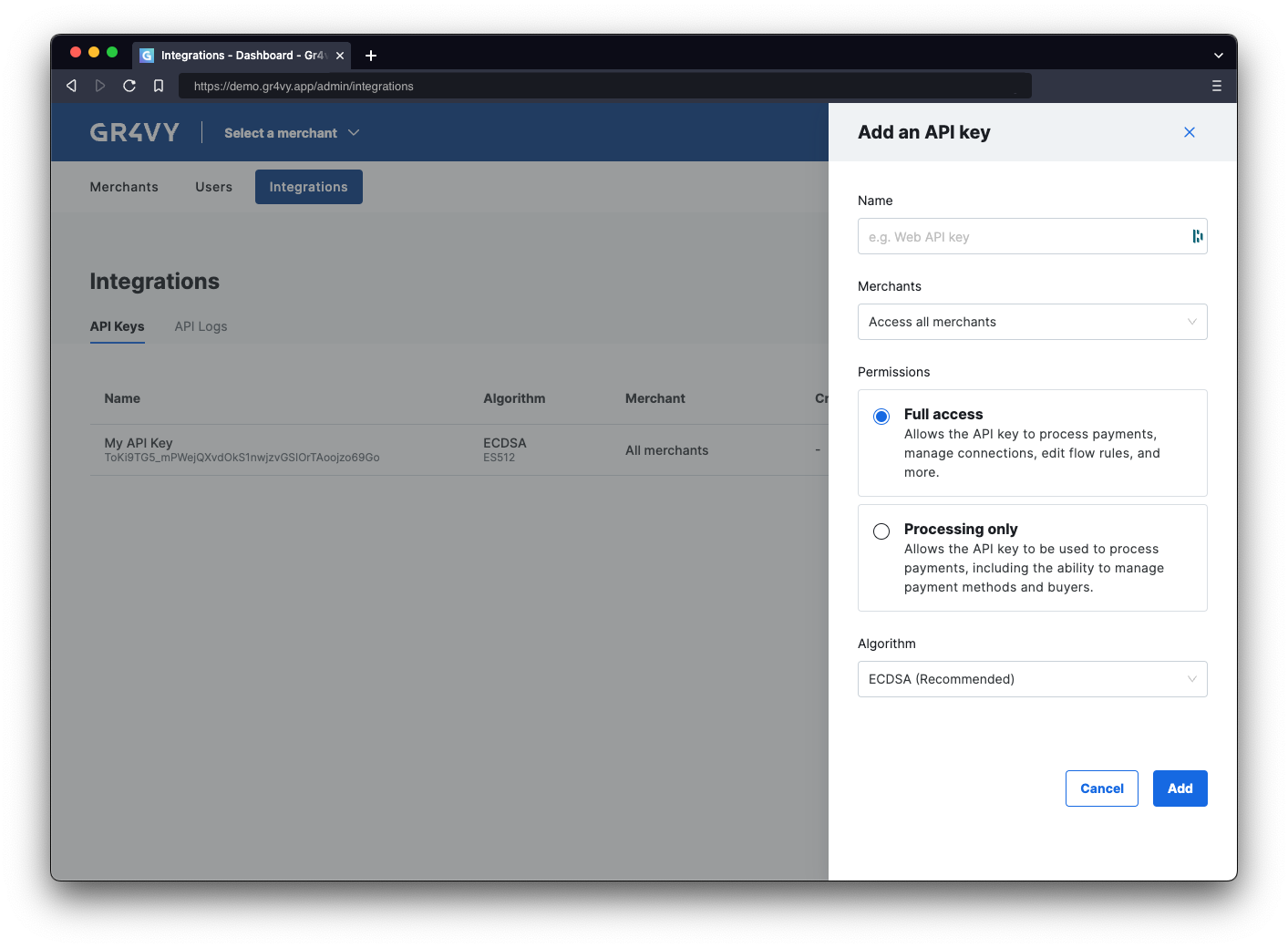
To use the API, generate a new API key. Head over to
the dashboard and visit the Integrations page.On this page, click the Add API key button select a name for the key. The name is purely to track what key is for what integration.
The downloaded key needs to be stored securely as it is not stored by the system.
Stored this API key in a secure place where the app can access it.
{"docsConfig":{"theme":"palm","$schema":"https://mintlify.com/docs.json","name":"Gr4vy","colors":{"primary":"#0066CC","light":"#0099FF","dark":"#0066CC"},"logo":{"light":"https://mintcdn.com/flexxbuy/AxFxa3X7-38b2HYz/assets/logos/light.svg?fit=max\u0026auto=format\u0026n=AxFxa3X7-38b2HYz\u0026q=85\u0026s=c8c719a4e76f3fc4418d42afd2c0ee99","dark":"https://mintcdn.com/flexxbuy/AxFxa3X7-38b2HYz/assets/logos/dark.svg?fit=max\u0026auto=format\u0026n=AxFxa3X7-38b2HYz\u0026q=85\u0026s=7a09594217c27f95e0d127250c4cc958"},"favicon":"https://mintcdn.com/flexxbuy/39tfKGesfNHyX7HE/assets/favicon.png?fit=max\u0026auto=format\u0026n=39tfKGesfNHyX7HE\u0026q=85\u0026s=fc89afd637da9116e218f41f2c6b1105","api":{"playground":{"display":"simple"},"examples":{"defaults":"required","languages":["csharp","go","java","php","python","javascript","curl"]},"mdx":{"auth":{"method":"bearer"},"server":["https://api.sandbox.flexxbuy.gr4vy.app","https://api.flexxbuy.gr4vy.app"]}},"navbar":{"links":[{"icon":"bell","href":"https://status.gr4vy.com","label":"Status"},{"icon":"github","href":"https://github.com/gr4vy","label":"GitHub"}],"primary":{"type":"button","label":"Gr4vy","href":"https://gr4vy.com/#form-contact"}},"footer":{"socials":{"website":"https://gr4vy.com","twitter":"https://twitter.com/Gr4vyInc","github":"https://github.com/gr4vy","linkedin":"https://www.linkedin.com/company/gr4vy-inc"},"links":[{"header":"About","items":[{"label":"Payment orchestration","href":"https://gr4vy.com/payment-orchestration"},{"label":"Gr4vy for merchants","href":"https://gr4vy.com/merchants"},{"label":"Gr4vy for platforms","href":"https://gr4vy.com/platforms"},{"label":"Increasing your revenue","href":"https://gr4vy.com/revenue"}]},{"header":"Developers","items":[{"label":"GitHub","href":"https://github.com/gr4vy"},{"label":"Latest news","href":"https://docs.gr4vy.com/updates"},{"label":"System status","href":"https://status.gr4vy.com"},{"label":"Customer support","href":"https://support.gr4vy.com"}]}]},"styling":{"eyebrows":"breadcrumbs","codeblocks":"system","latex":true},"integrations":{"gtm":{"tagId":"G-9CX4E9QWKQ"}},"contextual":{"options":["chatgpt","claude","copy","view"],"display":"header"},"interaction":{"drilldown":true},"navigation":{"pages":[]}},"deployment":{"deploymentMetadataValue":{"subdomain":"flexxbuy","hasAudioNarration":false,"actualSubdomain":"flexxbuy","customDomains":["docs.byzly.com"],"gitSource":{"type":"github","owner":"gr4vy","repo":"flexxbuy-docs-mintlify","deployBranch":"main","contentDirectory":"","isPrivate":true,"mountPath":"","label":""},"chroma":{"liveDeploymentHistoryId":"6adf64bc3d6319f7be041995","collectionId":"bdb65d06-a21b-40ca-800b-8b423f379e82","schemaVersion":"v3","latestBuiltDeploymentHistoryId":"6adf64bc3d6319f7be041995"},"entitlements":{"AI_CHAT":{"status":"DISABLED"}},"buildId":"6adf64bc3d6319f7be041995","clientVersion":"0.0.3966","searchFilterCounts":[{"language":"default","tag":"Build","count":195},{"language":"default","tag":"API Reference","count":171},{"language":"default","tag":"Connections","count":168},{"language":"default","tag":"Methods","count":141},{"language":"default","tag":"Features","count":95},{"language":"default","tag":"Integration guides","count":91},{"language":"default","tag":"Banking","count":46},{"language":"default","tag":"Dashboard","count":44},{"language":"default","tag":"Other","count":39},{"language":"default","tag":"Embed","count":38}]},"assistantConfig":{},"hasChatPermissions":false,"hasWebMcpPermissions":false,"toggles":[{"name":"kill-isr","enabled":true,"variant":{"name":"disabled","enabled":false,"feature_enabled":true},"impressionData":false},{"name":"agent-mintlify-slack","enabled":true,"variant":{"name":"disabled","enabled":false,"feature_enabled":true},"impressionData":false},{"name":"editor-v7-file-tree","enabled":true,"variant":{"name":"disabled","enabled":false,"feature_enabled":true},"impressionData":false},{"name":"agent-integrations-settings","enabled":true,"variant":{"name":"disabled","enabled":false,"feature_enabled":true},"impressionData":false},{"name":"automations-pr-grouping","enabled":true,"variant":{"name":"disabled","enabled":false,"feature_enabled":true},"impressionData":false},{"name":"custom-prefix","enabled":true,"variant":{"name":"disabled","enabled":false,"feature_enabled":true},"impressionData":false},{"name":"analytics-v7","enabled":true,"variant":{"name":"disabled","enabled":false,"feature_enabled":true},"impressionData":false},{"name":"user-flows-analytics","enabled":true,"variant":{"name":"disabled","enabled":false,"feature_enabled":true},"impressionData":false},{"name":"no-publish-flow","enabled":true,"variant":{"name":"disabled","enabled":false,"feature_enabled":true},"impressionData":false},{"name":"workos-onboarding","enabled":true,"variant":{"name":"disabled","enabled":false,"feature_enabled":true},"impressionData":false},{"name":"llms-txt-v2","enabled":true,"variant":{"name":"disabled","enabled":false,"feature_enabled":true},"impressionData":false},{"name":"pause-universal-search-reconcile","enabled":true,"variant":{"name":"disabled","enabled":false,"feature_enabled":true},"impressionData":false},{"name":"snapshot-serving-live","enabled":true,"variant":{"name":"disabled","enabled":false,"feature_enabled":true},"impressionData":false},{"name":"stripTemperatureMiddleware","enabled":true,"variant":{"name":"disabled","enabled":false,"feature_enabled":true},"impressionData":false},{"name":"per-site-search-delta","enabled":true,"variant":{"name":"disabled","enabled":false,"feature_enabled":true},"impressionData":false},{"name":"support-platform-pylon-zendesk","enabled":true,"variant":{"name":"disabled","enabled":false,"feature_enabled":true},"impressionData":false},{"name":"snapshot-serving","enabled":true,"variant":{"name":"disabled","enabled":false,"feature_enabled":true},"impressionData":false},{"name":"instant-rollback","enabled":true,"variant":{"name":"disabled","enabled":false,"feature_enabled":true},"impressionData":false},{"name":"granular-notifications-server","enabled":true,"variant":{"name":"disabled","enabled":false,"feature_enabled":true},"impressionData":false},{"name":"granular-notifications","enabled":true,"variant":{"name":"disabled","enabled":false,"feature_enabled":true},"impressionData":false},{"name":"editor-private-page-search","enabled":true,"variant":{"name":"disabled","enabled":false,"feature_enabled":true},"impressionData":false},{"name":"automations-fable","enabled":true,"variant":{"name":"disabled","enabled":false,"feature_enabled":true},"impressionData":false},{"name":"fixed-ai-action-pricing","enabled":true,"variant":{"name":"disabled","enabled":false,"feature_enabled":true},"impressionData":false},{"name":"automation-resolve-merge-conflict","enabled":true,"variant":{"name":"disabled","enabled":false,"feature_enabled":true},"impressionData":false},{"name":"scoped-publishing","enabled":true,"variant":{"name":"disabled","enabled":false,"feature_enabled":true},"impressionData":false},{"name":"mintql","enabled":true,"variant":{"name":"disabled","enabled":false,"feature_enabled":true},"impressionData":false},{"name":"page-level-analytics","enabled":true,"variant":{"name":"disabled","enabled":false,"feature_enabled":true},"impressionData":false},{"name":"editor-version-history-v2","enabled":true,"variant":{"name":"disabled","enabled":false,"feature_enabled":true},"impressionData":false},{"name":"editor-nav-generations","enabled":true,"variant":{"name":"disabled","enabled":false,"feature_enabled":true},"impressionData":false},{"name":"billing-page-v2","enabled":true,"variant":{"name":"disabled","enabled":false,"feature_enabled":true},"impressionData":false},{"name":"workspace-projects","enabled":true,"variant":{"name":"disabled","enabled":false,"feature_enabled":true},"impressionData":false},{"name":"assistant-v5","enabled":true,"variant":{"name":"disabled","enabled":false,"feature_enabled":true},"impressionData":false},{"name":"byok-sep-25","enabled":true,"variant":{"name":"disabled","enabled":false,"feature_enabled":true},"impressionData":false},{"name":"fork-pr-previews","enabled":true,"variant":{"name":"disabled","enabled":false,"feature_enabled":true},"impressionData":false},{"name":"revalidation-jwt","enabled":true,"variant":{"name":"disabled","enabled":false,"feature_enabled":true},"impressionData":false},{"name":"vite-origin","enabled":true,"variant":{"name":"disabled","enabled":false,"feature_enabled":true},"impressionData":false},{"name":"editor-agent-model-picker","enabled":true,"variant":{"name":"disabled","enabled":false,"feature_enabled":true},"impressionData":false},{"name":"billing-updated-9-15","enabled":true,"variant":{"name":"disabled","enabled":false,"feature_enabled":true},"impressionData":false},{"name":"hobby-abuse-scan","enabled":true,"variant":{"name":"disabled","enabled":false,"feature_enabled":true},"impressionData":false},{"name":"dashboard-inbox","enabled":true,"variant":{"name":"disabled","enabled":false,"feature_enabled":true},"impressionData":false}],"isAtlas":false,"googleFontsInlined":false},"customCss":[{"filePath":"style.css","content":".payment-service-definition{background-color:#fff!important;border:1px solid #0a0e0d1a;border-radius:16px;padding:2em;vertical-align:middle}.payment-service-definition img{margin:0 1em 0 0;max-width:3em;display:inline-block}.payment-service-definition h2{margin:0;display:inline-block;position:relative;top:.1em}#sidebar-title{text-transform:uppercase}#sidebar-group .group{flex-direction:row-reverse}#footer .max-w-36{max-width:40rem}"}],"page":{"pagePath":"guides/payments/android/quick-start/key","slug":"/guides/payments/android/quick-start/key","pageMetadata":{"title":"Creating an API key for use with Android","sidebarTitle":"API keys","description":null,"href":"/guides/payments/android/quick-start/key"},"pageType":"default","mdx":{"mdxSource":{"compiledSource":"\"use strict\";const{Fragment:_Fragment,jsx:_jsx,jsxs:_jsxs}=arguments[0];const{useMDXComponents:_provideComponents}=arguments[0];function _createMdxContent(props){const _components={a:`a`,code:`code`,li:`li`,p:`p`,pre:`pre`,span:`span`,strong:`strong`,ul:`ul`,..._provideComponents(),...props.components},{CodeBlock,Heading,Info,OptimizedImage,Tip}=_components;if(!CodeBlock)_missingMdxReference(`CodeBlock`,true);if(!Heading)_missingMdxReference(`Heading`,true);if(!Info)_missingMdxReference(`Info`,true);if(!OptimizedImage)_missingMdxReference(`OptimizedImage`,true);if(!Tip)_missingMdxReference(`Tip`,true);return _jsxs(_Fragment,{children:[_jsxs(_components.p,{children:[`Before the app can communicate with the API, create a new API key. The API handles authentication using a signed `,_jsx(_components.strong,{children:`JSON\nWeb Token`}),` (JWT) which is passed in an HTTP header.`]}),`\n`,_jsx(CodeBlock,{filename:``,numberOfLines:`2`,language:`shellscript`,children:_jsx(_components.pre,{className:`shiki shiki-themes github-light-default dark-plus`,style:{backgroundColor:`#ffffff`,\"--shiki-dark-bg\":`#0B0C0E`,color:`#1f2328`,\"--shiki-dark\":`#D4D4D4`},language:`shellscript`,children:_jsxs(_components.code,{language:`shellscript`,numberOfLines:`2`,children:[_jsxs(_components.span,{className:`line`,children:[_jsx(_components.span,{style:{color:`#953800`,\"--shiki-dark\":`#DCDCAA`},children:`curl`}),_jsx(_components.span,{style:{color:`#0550AE`,\"--shiki-dark\":`#569CD6`},children:` -X`}),_jsx(_components.span,{style:{color:`#0A3069`,\"--shiki-dark\":`#CE9178`},children:` GET`}),_jsx(_components.span,{style:{color:`#0A3069`,\"--shiki-dark\":`#CE9178`},children:` https://api.example.gr4vy.app/transactions`}),_jsx(_components.span,{style:{color:`#CF222E`,\"--shiki-dark\":`#D7BA7D`},children:` \\\\`})]}),`\n`,_jsxs(_components.span,{className:`line`,children:[_jsx(_components.span,{style:{color:`#0550AE`,\"--shiki-dark\":`#569CD6`},children:` -H`}),_jsx(_components.span,{style:{color:`#0A3069`,\"--shiki-dark\":`#CE9178`},children:` \"authorization: bearer eyJhbGciOiJIUzI1NiIsInR5cCI6IkpXVCJ9.eyJzdWIi...\"`})]}),`\n`]})})}),`\n`,_jsx(Tip,{children:_jsx(_components.p,{children:`Using an SDK is recommended. The SDKs make the process of generating a token a lot easier and are probably\navailable in the preferred programming language. This is covered in the\nnext step.`})}),`\n`,_jsx(Heading,{level:`2`,id:`create-a-new-api-key`,children:`Create a new API key`}),`\n`,_jsxs(_components.p,{children:[`To use the API, generate a new `,_jsx(_components.strong,{children:`API key`}),`. Head over to\nthe dashboard and visit the `,_jsx(_components.strong,{children:`Integrations`}),` page.`]}),`\n`,_jsx(OptimizedImage,{src:`https://mintcdn.com/flexxbuy/39tfKGesfNHyX7HE/assets/images/api-keys/add-key.png?fit=max\u0026auto=format\u0026n=39tfKGesfNHyX7HE\u0026q=85\u0026s=7eda8dbde23672e2587454af6f11a36d`,alt:`API key dashboard`,\"data-og-width\":`1413`,width:`1413`,\"data-og-height\":`1040`,height:`1040`,\"data-path\":`assets/images/api-keys/add-key.png`,\"data-optimize\":`true`,\"data-opv\":`3`,srcset:`https://mintcdn.com/flexxbuy/39tfKGesfNHyX7HE/assets/images/api-keys/add-key.png?w=280\u0026fit=max\u0026auto=format\u0026n=39tfKGesfNHyX7HE\u0026q=85\u0026s=abd2280670e13f28d94bbbc4671808b1 280w, https://mintcdn.com/flexxbuy/39tfKGesfNHyX7HE/assets/images/api-keys/add-key.png?w=560\u0026fit=max\u0026auto=format\u0026n=39tfKGesfNHyX7HE\u0026q=85\u0026s=6d8d9c4815254bbc798242afa516b748 560w, https://mintcdn.com/flexxbuy/39tfKGesfNHyX7HE/assets/images/api-keys/add-key.png?w=840\u0026fit=max\u0026auto=format\u0026n=39tfKGesfNHyX7HE\u0026q=85\u0026s=0dea0e277d1137ff5486bed7bec0556f 840w, https://mintcdn.com/flexxbuy/39tfKGesfNHyX7HE/assets/images/api-keys/add-key.png?w=1100\u0026fit=max\u0026auto=format\u0026n=39tfKGesfNHyX7HE\u0026q=85\u0026s=969a2ea58d1f7a614281e5602008e844 1100w, https://mintcdn.com/flexxbuy/39tfKGesfNHyX7HE/assets/images/api-keys/add-key.png?w=1650\u0026fit=max\u0026auto=format\u0026n=39tfKGesfNHyX7HE\u0026q=85\u0026s=7cb0a3be1ce07a2ab19013899d9a77e5 1650w, https://mintcdn.com/flexxbuy/39tfKGesfNHyX7HE/assets/images/api-keys/add-key.png?w=2500\u0026fit=max\u0026auto=format\u0026n=39tfKGesfNHyX7HE\u0026q=85\u0026s=60c571fb3bffcfeeeba8c8b9bf8af39b 2500w`}),`\n`,_jsxs(_components.p,{children:[`On this page, click the `,_jsx(_components.strong,{children:`Add API key`}),` button select a name for the key. The name is purely to track what key is for what integration.\nThe downloaded key needs to be stored securely as it is not stored by the system.`]}),`\n`,_jsx(Info,{children:_jsxs(_components.p,{children:[`Learn more about private keys, key-pairs, and JWT in the\n`,_jsx(_components.a,{href:`/guides/api/authentication`,children:`in-depth guide on authentication`}),`.`]})}),`\n`,_jsx(Heading,{level:`2`,id:`summary`,children:`Summary`}),`\n`,_jsx(_components.p,{children:`In this step:`}),`\n`,_jsxs(_components.ul,{children:[`\n`,_jsx(_components.li,{children:`Learned about API authentication.`}),`\n`,_jsx(_components.li,{children:`Created a new private key for the API.`}),`\n`,_jsx(_components.li,{children:`Stored this API key in a secure place where the app can access it.`}),`\n`]})]})}function MDXContent(props={}){const{wrapper:MDXLayout}={..._provideComponents(),...props.components};return MDXLayout?_jsx(MDXLayout,{...props,children:_jsx(_createMdxContent,{...props})}):_createMdxContent(props)}return{default:MDXContent};function _missingMdxReference(id,component){throw new Error(`Expected `+(component?`component`:`object`)+\" `\"+id+\"` to be defined: you likely forgot to import, pass, or provide it.\")}","frontmatter":{},"scope":{"codeStyling":"system","config":{},"pageMetadata":{"title":"Creating an API key for use with Android","sidebarTitle":"API keys","description":null,"href":"/guides/payments/android/quick-start/key"}}},"mdxSourceWithNoJs":null},"mdxExtracts":{"tableOfContents":[{"title":"Create a new API key","slug":"create-a-new-api-key","depth":2,"children":[]},{"title":"Summary","slug":"summary","depth":2,"children":[]}],"codeExamples":{}},"jsLinks":[],"subdomain":"flexxbuy","siteName":"Gr4vy","title":"Creating an API key for use with Android - Gr4vy","navMaps":{"firstHrefInVersion":{},"firstHrefInLanguage":{}},"lastModified":"2026-10-21T13:44:51.114Z","originalFileLocation":"guides/payments/android/quick-start/key.mdx"},"headHtml":"\u003cscript data-mint-head>(function(){var d=document.documentElement,p=null;if(!p){try{p=localStorage.getItem(\"isDarkMode\")}catch(e){}if(p==='true')p='dark';else if(p==='false')p='light';if(p!=='light'\u0026\u0026p!=='dark'\u0026\u0026p!=='system')p=\"system\"}var r=p==='system'?(matchMedia(\"(prefers-color-scheme: dark)\").matches?'dark':'light'):p;d.classList.remove(r==='dark'?'light':'dark');d.classList.add(r);d.setAttribute(\"data-theme-preference\",p)})();\u003c/script>\u003cmeta data-mint-head name=\"application-name\" content=\"Gr4vy\">\u003cmeta data-mint-head name=\"generator\" content=\"Mintlify\">\u003clink data-mint-head rel=\"icon\" type=\"image/png\" sizes=\"192x192\" href=\"/mintlify-assets/_mintlify/favicons/flexxbuy/UwX1s5aPWOD2LQQg/_generated/favicon/android-chrome-192x192.png\" media=\"(prefers-color-scheme: light)\">\u003clink data-mint-head rel=\"apple-touch-icon\" type=\"image/png\" sizes=\"180x180\" href=\"/mintlify-assets/_mintlify/favicons/flexxbuy/UwX1s5aPWOD2LQQg/_generated/favicon/apple-touch-icon.png\">\u003clink data-mint-head rel=\"icon\" type=\"image/png\" sizes=\"16x16\" href=\"/mintlify-assets/_mintlify/favicons/flexxbuy/UwX1s5aPWOD2LQQg/_generated/favicon/favicon-16x16.png\" media=\"(prefers-color-scheme: light)\">\u003clink data-mint-head rel=\"icon\" type=\"image/png\" sizes=\"32x32\" href=\"/mintlify-assets/_mintlify/favicons/flexxbuy/UwX1s5aPWOD2LQQg/_generated/favicon/favicon-32x32.png\" media=\"(prefers-color-scheme: light)\">\u003clink data-mint-head rel=\"shortcut icon\" type=\"image/x-icon\" href=\"/mintlify-assets/_mintlify/favicons/flexxbuy/UwX1s5aPWOD2LQQg/_generated/favicon/favicon.ico\" media=\"(prefers-color-scheme: light)\">\u003clink data-mint-head rel=\"icon\" type=\"image/png\" sizes=\"192x192\" href=\"/mintlify-assets/_mintlify/favicons/flexxbuy/UwX1s5aPWOD2LQQg/_generated/favicon-dark/android-chrome-192x192.png\" media=\"(prefers-color-scheme: dark)\">\u003clink data-mint-head rel=\"icon\" type=\"image/png\" sizes=\"16x16\" href=\"/mintlify-assets/_mintlify/favicons/flexxbuy/UwX1s5aPWOD2LQQg/_generated/favicon-dark/favicon-16x16.png\" media=\"(prefers-color-scheme: dark)\">\u003clink data-mint-head rel=\"icon\" type=\"image/png\" sizes=\"32x32\" href=\"/mintlify-assets/_mintlify/favicons/flexxbuy/UwX1s5aPWOD2LQQg/_generated/favicon-dark/favicon-32x32.png\" media=\"(prefers-color-scheme: dark)\">\u003clink data-mint-head rel=\"shortcut icon\" type=\"image/x-icon\" href=\"/mintlify-assets/_mintlify/favicons/flexxbuy/UwX1s5aPWOD2LQQg/_generated/favicon-dark/favicon.ico\" media=\"(prefers-color-scheme: dark)\">\u003cmeta data-mint-head property=\"og:title\" content=\"Creating an API key for use with Android - Gr4vy\">\u003cmeta data-mint-head property=\"og:site_name\" content=\"Gr4vy\">\u003cmeta data-mint-head property=\"og:url\" content=\"https://docs.byzly.com/guides/payments/android/quick-start/key\">\u003cmeta data-mint-head property=\"og:type\" content=\"website\">\u003cmeta data-mint-head property=\"og:image\" content=\"https://flexxbuy.mintlify.app/_mintlify/api/og/v2?division=Android\u0026amp;title=Creating+an+API+key+for+use+with+Android\u0026amp;theme=93f51384d2ec49fce20f3d31\u0026amp;signature=dfd1eeb0c8dec8b706439f0a36a33d1a025eff12d726fcdafe0b7b1a1f7d40d0\">\u003cmeta data-mint-head property=\"og:image:width\" content=\"1200\">\u003cmeta data-mint-head property=\"og:image:height\" content=\"630\">\u003cmeta data-mint-head name=\"twitter:card\" content=\"summary_large_image\">\u003cmeta data-mint-head name=\"twitter:title\" content=\"Creating an API key for use with Android - Gr4vy\">\u003cmeta data-mint-head name=\"twitter:image\" content=\"https://flexxbuy.mintlify.app/_mintlify/api/og/v2?division=Android\u0026amp;title=Creating+an+API+key+for+use+with+Android\u0026amp;theme=93f51384d2ec49fce20f3d31\u0026amp;signature=dfd1eeb0c8dec8b706439f0a36a33d1a025eff12d726fcdafe0b7b1a1f7d40d0\">\u003cmeta data-mint-head name=\"twitter:image:width\" content=\"1200\">\u003cmeta data-mint-head name=\"twitter:image:height\" content=\"630\">\u003cmeta data-mint-head name=\"msapplication-config\" content=\"/mintlify-assets/_mintlify/favicons/flexxbuy/UwX1s5aPWOD2LQQg/_generated/favicon/browserconfig.xml\">\u003cmeta data-mint-head name=\"apple-mobile-web-app-title\" content=\"Gr4vy\">\u003cmeta data-mint-head name=\"msapplication-TileColor\" content=\"#0066CC\">\u003clink data-mint-head rel=\"canonical\" href=\"https://docs.byzly.com/guides/payments/android/quick-start/key\">\u003clink data-mint-head rel=\"alternate\" type=\"application/xml\" href=\"/sitemap.xml\">\u003clink data-mint-head rel=\"alternate\" type=\"text/markdown\" href=\"/guides/payments/android/quick-start/key.md\">\u003cscript data-mint-head type=\"application/ld+json\">{\"@context\":\"https://schema.org\",\"@graph\":[{\"@type\":\"Organization\",\"@id\":\"https://docs.byzly.com/#organization\",\"name\":\"Gr4vy\",\"url\":\"https://docs.byzly.com\",\"logo\":{\"@type\":\"ImageObject\",\"url\":\"https://mintcdn.com/flexxbuy/AxFxa3X7-38b2HYz/assets/logos/light.svg?fit=max\u0026auto=format\u0026n=AxFxa3X7-38b2HYz\u0026q=85\u0026s=c8c719a4e76f3fc4418d42afd2c0ee99\"}},{\"@type\":\"WebSite\",\"@id\":\"https://docs.byzly.com#website\",\"name\":\"Gr4vy\",\"url\":\"https://docs.byzly.com\",\"publisher\":{\"@id\":\"https://docs.byzly.com/#organization\"}},{\"@type\":\"WebPage\",\"@id\":\"https://docs.byzly.com/guides/payments/android/quick-start/key#webpage\",\"url\":\"https://docs.byzly.com/guides/payments/android/quick-start/key\",\"name\":\"Creating an API key for use with Android\",\"dateModified\":\"2026-10-21T13:44:51.114Z\",\"isPartOf\":{\"@id\":\"https://docs.byzly.com#website\"},\"breadcrumb\":{\"@id\":\"https://docs.byzly.com/guides/payments/android/quick-start/key#breadcrumb\"}},{\"@type\":\"BreadcrumbList\",\"@id\":\"https://docs.byzly.com/guides/payments/android/quick-start/key#breadcrumb\",\"itemListElement\":[{\"@type\":\"ListItem\",\"position\":1,\"name\":\"Integration guides\",\"item\":\"https://docs.byzly.com/guides/payments/embed/quick-start/overview\"},{\"@type\":\"ListItem\",\"position\":2,\"name\":\"Embed\",\"item\":\"https://docs.byzly.com/guides/payments/embed/quick-start/overview\"},{\"@type\":\"ListItem\",\"position\":3,\"name\":\"Android\",\"item\":\"https://docs.byzly.com/guides/payments/android/quick-start/overview\"},{\"@type\":\"ListItem\",\"position\":4,\"name\":\"Creating an API key for use with Android\",\"item\":\"https://docs.byzly.com/guides/payments/android/quick-start/key\"}]},{\"@type\":[\"Article\",\"TechArticle\"],\"@id\":\"https://docs.byzly.com/guides/payments/android/quick-start/key#article\",\"headline\":\"Creating an API key for use with Android\",\"name\":\"Creating an API key for use with Android\",\"url\":\"https://docs.byzly.com/guides/payments/android/quick-start/key\",\"mainEntityOfPage\":{\"@id\":\"https://docs.byzly.com/guides/payments/android/quick-start/key#webpage\"},\"dateModified\":\"2026-10-21T13:44:51.114Z\",\"publisher\":{\"@id\":\"https://docs.byzly.com/#organization\"},\"isPartOf\":{\"@id\":\"https://docs.byzly.com#website\"}}]}\u003c/script>\u003cscript data-mint-head type=\"application/ld+json\">{\"@context\":\"https://schema.org\",\"@type\":\"WebSite\",\"name\":\"Gr4vy\",\"creator\":{\"@type\":\"Organization\",\"name\":\"Mintlify\",\"url\":\"https://mintlify.com\"}}\u003c/script>","siteName":"Gr4vy","nav":{"global":null,"tabs":[{"tab":"Build","icon":"credit-card","groups":[{"group":"Get started","icon":"compass","pages":[{"sidebarTitle":"Overview","title":"Connect, build, and scale payments","mode":"wide","href":"/guides/get-started"},{"title":"Accept payments on the web","sidebarTitle":"Web payments","href":"/guides/payments/web"},{"title":"Accept payments on mobile","sidebarTitle":"Mobile payments","href":"/guides/payments/mobile"}]},{"group":"Integration guides","icon":"code","pages":[{"group":"Embed","pages":[{"group":"Web","pages":[{"title":"Embed","sidebarTitle":"Introduction","href":"/guides/payments/embed/quick-start/overview"},{"title":"Creating an API key for use with Embed","sidebarTitle":"API keys","href":"/guides/payments/embed/quick-start/key"},{"title":"Generating tokens for authentication","sidebarTitle":"Authentication","href":"/guides/payments/embed/quick-start/sdks"},{"title":"Adding Embed","sidebarTitle":"Embed checkout","href":"/guides/payments/embed/quick-start/embed"},{"title":"Inspecting transactions","sidebarTitle":"Transaction inspection","href":"/guides/payments/embed/quick-start/inspect"},{"title":"Going live","sidebarTitle":"Going live","href":"/guides/payments/embed/quick-start/live"},{"title":"Digital wallets in Embed","sidebarTitle":"Digital wallets","href":"/guides/payments/embed/digital-wallets"},{"title":"Embed events","sidebarTitle":"Events","href":"/guides/payments/embed/events"},{"title":"Embed localization","sidebarTitle":"Locales","href":"/guides/payments/embed/locale"},{"title":"Embed Theming","sidebarTitle":"Theming","href":"/guides/payments/embed/theming"},{"title":"Embed options","sidebarTitle":"Options","mode":"wide","href":"/guides/payments/embed/options"},{"title":"In-app browsers with Embed","sidebarTitle":"In-app browsers","href":"/guides/payments/embed/in-app-browsers"},{"title":"Common issues with Embed","sidebarTitle":"Common issues","href":"/guides/payments/embed/common-issues"}]},{"group":"Android","pages":[{"title":"Android SDK","sidebarTitle":"Introduction","description":"Get set up with the Android SDK for your checkout experience.","href":"/guides/payments/android/quick-start/overview"},{"title":"Creating an API key for use with Android","sidebarTitle":"API keys","href":"/guides/payments/android/quick-start/key"},{"title":"Generating tokens for authentication","sidebarTitle":"Authentication","description":null,"href":"/guides/payments/android/quick-start/sdks"},{"title":"Installing the Android SDK","sidebarTitle":"SDK installation","href":"/guides/payments/android/quick-start/android"},{"title":"Creating transactions","sidebarTitle":"Transactions","href":"/guides/payments/android/quick-start/transact"},{"title":"Google Pay on Android","sidebarTitle":"Google Pay","href":"/guides/payments/android/google-pay"},{"title":"Android events","sidebarTitle":"Events","href":"/guides/payments/android/events"},{"title":"Android options","sidebarTitle":"Options","mode":"wide","href":"/guides/payments/android/options"}]},{"group":"iOS","pages":[{"title":"iOS SDK","sidebarTitle":"Introduction","href":"/guides/payments/ios/quick-start/overview"},{"title":"Creating an API key for use with iOS","sidebarTitle":"API keys","href":"/guides/payments/ios/quick-start/key"},{"title":"Generating tokens for authentication","sidebarTitle":"Authentication","href":"/guides/payments/ios/quick-start/sdks"},{"title":"Installing the iOS SDK","sidebarTitle":"SDK installation","href":"/guides/payments/ios/quick-start/ios"},{"title":"Creating transactions","sidebarTitle":"Transactions","href":"/guides/payments/ios/quick-start/transact"},{"title":"Apple Pay on iOS","sidebarTitle":"Apple Pay","href":"/guides/payments/ios/apple-pay"},{"title":"iOS events","sidebarTitle":"Events","href":"/guides/payments/ios/events"},{"title":"iOS options","sidebarTitle":"Options","mode":"wide","href":"/guides/payments/ios/options"}]},{"group":"React Native","pages":[{"title":"React Native SDK","sidebarTitle":"Introduction","href":"/guides/payments/react-native/quick-start/overview"},{"title":"Creating an API key for use with React Native","sidebarTitle":"API keys","href":"/guides/payments/react-native/quick-start/key"},{"title":"Generating tokens for authentication","sidebarTitle":"Authentication","href":"/guides/payments/react-native/quick-start/sdks"},{"title":"Installing the React Native SDK","sidebarTitle":"SDK installation","href":"/guides/payments/react-native/quick-start/embed"},{"title":"Creating transactions","sidebarTitle":"Transactions","href":"/guides/payments/react-native/quick-start/transact"},{"title":"Apple Pay on React Native","sidebarTitle":"Apple Pay","href":"/guides/payments/react-native/apple-pay"},{"title":"Google Pay on React Native","sidebarTitle":"Google Pay","href":"/guides/payments/react-native/google-pay"},{"title":"React Native events","sidebarTitle":"Events","href":"/guides/payments/react-native/events"},{"title":"React Native options","sidebarTitle":"Options","mode":"wide","href":"/guides/payments/react-native/options"}]}]},{"group":"Secure Fields","pages":[{"title":"Secure Fields","sidebarTitle":"Introduction","href":"/guides/payments/secure-fields/quick-start/overview"},{"title":"Creating an API key for use with Secure Fields","sidebarTitle":"API keys","href":"/guides/payments/secure-fields/quick-start/key"},{"title":"Creating checkout sessions","sidebarTitle":"Checkout sessions","href":"/guides/payments/secure-fields/quick-start/sdks"},{"title":"Adding secure fields","sidebarTitle":"Secure fields","href":"/guides/payments/secure-fields/quick-start/embed"},{"title":"Creating transactions","sidebarTitle":"Transactions","href":"/guides/payments/secure-fields/quick-start/transact"},{"title":"Secure Fields and 3DS","sidebarTitle":"3DS","href":"/guides/payments/secure-fields/three-d-secure"},{"title":"Secure Fields with stored cards","sidebarTitle":"Stored cards","href":"/guides/payments/secure-fields/stored-cards"},{"title":"Secure Fields theming","sidebarTitle":"Theming","href":"/guides/payments/secure-fields/theming"},{"title":"Secure Fields events","sidebarTitle":"Events","href":"/guides/payments/secure-fields/events"},{"title":"Secure Fields UX options","sidebarTitle":"UX options","href":"/guides/payments/secure-fields/ux-options"}]},{"group":"Direct API","pages":[{"title":"Direct API","sidebarTitle":"Introduction","href":"/guides/payments/direct-api/quick-start/overview"},{"title":"Authentication","sidebarTitle":"Authentication","href":"/guides/payments/direct-api/quick-start/key"},{"title":"Listing payment options","sidebarTitle":"Payment options","href":"/guides/payments/direct-api/quick-start/payment-options"},{"title":"Creating transactions","sidebarTitle":"Transactions","href":"/guides/payments/direct-api/quick-start/transaction"},{"title":"Handling redirects","sidebarTitle":"Redirects","href":"/guides/payments/direct-api/quick-start/handle-redirect"},{"title":"Getting transaction results","sidebarTitle":"Transaction results","href":"/guides/payments/direct-api/quick-start/status"},{"title":"PayPal via the API","sidebarTitle":"PayPal","href":"/guides/payments/direct-api/paypal"}]},{"group":"Native SDKs","pages":[{"title":"Native Mobile SDKs","sidebarTitle":"Overview","href":"/guides/payments/native/overview"},{"title":"Create an API key","sidebarTitle":"API keys","href":"/guides/payments/native/key"},{"title":"Generating tokens for authentication","sidebarTitle":"Authentication","href":"/guides/payments/native/sdks"},{"title":"Vaulting card data","sidebarTitle":"Vaulting","href":"/guides/payments/native/vault"},{"title":"Adding 3DS authentication","sidebarTitle":"3DS","href":"/guides/payments/native/3ds"},{"sidebarTitle":"Get card details","title":"Card details","href":"/guides/payments/native/get-card-details"},{"sidebarTitle":"Payment options","title":"List payment options","href":"/guides/payments/native/list-payment-options"},{"sidebarTitle":"Buyer payment methods","title":"List buyer payment methods","href":"/guides/payments/native/list-buyer-payment-methods"},{"title":"SDK Response Reference","sidebarTitle":"Responses","href":"/guides/payments/native/responses"}]},{"group":"Agentic Development Kit","pages":[{"title":"Agentic Development Kit (ADK)","sidebarTitle":"Overview","href":"/guides/payments/adk/overview"},{"group":"ChatGPT","pages":[{"title":"ChatGPT ADK","sidebarTitle":"Introduction","href":"/guides/payments/chatgpt-app/overview"},{"title":"Architecture","sidebarTitle":"Architecture","href":"/guides/payments/chatgpt-app/architecture"},{"title":"Set up the project","sidebarTitle":"Setup","href":"/guides/payments/chatgpt-app/setup"},{"title":"Build the MCP server","sidebarTitle":"MCP server","href":"/guides/payments/chatgpt-app/mcp-server"},{"title":"Build the widgets","sidebarTitle":"Widgets","href":"/guides/payments/chatgpt-app/widgets"},{"title":"Integrate Gr4vy Embed","sidebarTitle":"Gr4vy Embed","href":"/guides/payments/chatgpt-app/gr4vy-embed"},{"title":"Deploy to ChatGPT","sidebarTitle":"Deployment","href":"/guides/payments/chatgpt-app/deployment"}]}]},{"group":"Vaulting","pages":[{"title":"Vaulting","sidebarTitle":"Overview","href":"/guides/features/vault-forwarding/overview"},{"title":"Tokenize a card","sidebarTitle":"Tokenize","href":"/guides/features/vault-forwarding/tokenize"},{"title":"Provision a PSP token","sidebarTitle":"PSP tokens","href":"/guides/features/vault-forwarding/psp-tokens"},{"title":"Vault Forward card data to API endpoint","sidebarTitle":"Forward to endpoint","href":"/guides/features/vault-forwarding/forward"}]},{"group":"E-commerce Plugins","pages":[{"group":"commercetools","pages":[{"title":"commercetools Integration","sidebarTitle":"Overview","href":"/guides/payments/commercetools/overview"},{"title":"commercetools Installation","sidebarTitle":"Installation","href":"/guides/payments/commercetools/installation"},{"title":"commercetools Configuration","sidebarTitle":"Configuration","href":"/guides/payments/commercetools/configuration"},{"title":"commercetools Administration","sidebarTitle":"Administration","href":"/guides/payments/commercetools/backend"},{"title":"commercetools Frontend","sidebarTitle":"Frontend","href":"/guides/payments/commercetools/frontend"}]},{"group":"Magento","pages":[{"title":"Magento Plugin","sidebarTitle":"Overview","href":"/guides/payments/magento/overview"},{"title":"Magento Installation","sidebarTitle":"Installation","href":"/guides/payments/magento/installation"},{"title":"Magento Configuration","sidebarTitle":"Configuration","href":"/guides/payments/magento/configuration"},{"title":"Magento Administration","sidebarTitle":"Administration","href":"/guides/payments/magento/backend"},{"title":"Magento Frontend","sidebarTitle":"Frontend","href":"/guides/payments/magento/frontend"}]},{"group":"Salesforce Commerce Cloud","pages":[{"title":"Salesforce Commerce Cloud Cartridge","sidebarTitle":"Overview","href":"/guides/payments/sfcc/overview"},{"title":"Salesforce Commerce Cloud Installation","sidebarTitle":"Installation","href":"/guides/payments/sfcc/installation"},{"title":"Salesforce Commerce Cloud Configuration","sidebarTitle":"Configuration","href":"/guides/payments/sfcc/configuration"},{"title":"Salesforce Commerce Cloud Administration","sidebarTitle":"Administration","href":"/guides/payments/sfcc/backend"},{"title":"Salesforce Commerce Cloud Frontend","sidebarTitle":"Frontend","href":"/guides/payments/sfcc/frontend"}]}]}]},{"group":"Best Practices","icon":"lightbulb","pages":[{"title":"Best practices","href":"/guides/best-practices/overview"},{"title":"Identifiers \u0026 reconciliation","sidebarTitle":"IDs \u0026 reconciliation","href":"/guides/ids"},{"title":"Idempotent requests","href":"/guides/api/idempotent-requests"},{"sidebarTitle":"Timeouts","title":"Handling transaction timeout","mode":"wide","href":"/guides/timeouts"}]},{"group":"Resources","icon":"toolbox","pages":[{"title":"Command Line Interface (CLI)","sidebarTitle":"CLI","href":"/guides/tools/cli"},{"title":"Postman Collection","sidebarTitle":"Postman","href":"/guides/tools/postman"},{"title":"OpenAPI 3.1.0 Specification","sidebarTitle":"OpenAPI","href":"/guides/api/openapi"}]},{"group":"Features","icon":"sliders","pages":[{"group":"3-D Secure","pages":[{"title":"3-D Secure","sidebarTitle":"Overview","href":"/guides/features/3ds/overview"},{"title":"3-D Secure Setup","sidebarTitle":"Setup","href":"/guides/features/3ds/setup"},{"title":"Setup 3DS card schemes","sidebarTitle":"Schemes","href":"/guides/features/3ds/schemes"},{"title":"3-D Secure with multiple connections","sidebarTitle":"Multiple connections","href":"/guides/features/3ds/multiple-connections"},{"title":"3-D Secure in Embed","sidebarTitle":"Embed","href":"/guides/features/3ds/embed"},{"title":"Hosted 3-D Secure","sidebarTitle":"Hosted","href":"/guides/features/3ds/hosted"},{"title":"Native 3-D Secure","sidebarTitle":"Native","href":"/guides/features/3ds/native"},{"title":"Pass-through External 3-D Secure data","sidebarTitle":"External","href":"/guides/features/3ds/external"},{"title":"3DS authentication results","sidebarTitle":"Results","href":"/guides/features/3ds/statuses"},{"title":"3-D Secure testing","sidebarTitle":"Testing","href":"/guides/features/3ds/testing"},{"title":"3DS Scenarios","sidebarTitle":"Scenarios","href":"/guides/features/3ds/scenarios"}]},{"group":"Account updater","pages":[{"title":"Account Updater","sidebarTitle":"Overview","href":"/guides/features/account-updater/overview"},{"title":"Manual account updates","sidebarTitle":"Manual updates","href":"/guides/features/account-updater/integration"},{"title":"Scheduled account updates","sidebarTitle":"Scheduled updates","href":"/guides/features/account-updater/scheduler"},{"title":"Real time account updates","sidebarTitle":"Real time updates","href":"/guides/features/account-updater/real-time"}]},{"group":"AFTs","pages":[{"title":"Account funding transactions","sidebarTitle":"Overview","href":"/guides/features/account-funding-transactions/overview"}]},{"group":"Anti-fraud","pages":[{"title":"Anti-fraud","sidebarTitle":"Overview","href":"/guides/features/anti-fraud/overview"},{"title":"Anti-fraud setup","sidebarTitle":"Setup","href":"/guides/features/anti-fraud/setup"},{"title":"Silent mode","sidebarTitle":"Silent mode","href":"/guides/features/anti-fraud/silent-mode"},{"title":"Automatic anti-fraud device fingerprinting","sidebarTitle":"Fingerprints","href":"/guides/features/anti-fraud/fingerprint"},{"title":"Anti-fraud reviews","sidebarTitle":"Reviews","href":"/guides/features/anti-fraud/reviews"},{"title":"Anti-fraud simulator","sidebarTitle":"Simulator","href":"/guides/features/anti-fraud/simulator"}]},{"group":"Apple Pay","pages":[{"title":"Apple Pay","sidebarTitle":"Overview","href":"/guides/features/apple-pay/overview"},{"title":"Apple Pay on web with Embed","sidebarTitle":"Web with Embed","href":"/guides/features/apple-pay/web"},{"title":"Apple Pay on web without Embed","sidebarTitle":"Web without Embed","href":"/guides/features/apple-pay/web-without-sdk"},{"title":"Apple Pay on iOS with the SDK","sidebarTitle":"iOS with SDK","href":"/guides/features/apple-pay/ios"},{"title":"Apple Pay on iOS without the SDK","sidebarTitle":"iOS without SDK","href":"/guides/features/apple-pay/ios-without-sdk"},{"title":"Decrypted Apple Pay tokens","sidebarTitle":"Decrypted tokens","href":"/guides/features/apple-pay/decrypted-tokens"}]},{"group":"Click to Pay","pages":[{"title":"Click to Pay","sidebarTitle":"Overview","href":"/guides/features/click-to-pay/overview"},{"title":"Click to Pay Setup","sidebarTitle":"Setup","href":"/guides/features/click-to-pay/setup"},{"title":"Customer Authentication Module (CAM)","sidebarTitle":"Customer Authentication","href":"/guides/features/click-to-pay/cam"},{"title":"Token Authentication Service (TAS)","sidebarTitle":"Token Authentication","href":"/guides/features/click-to-pay/tas"}]},{"group":"Gift Cards","pages":[{"title":"Gift Cards","sidebarTitle":"Overview","href":"/guides/features/gift-cards/overview"},{"title":"Gift card simulator","sidebarTitle":"Simulator","href":"/guides/features/gift-cards/simulator"}]},{"group":"Google Pay","pages":[{"title":"Google Pay","sidebarTitle":"Overview","href":"/guides/features/google-pay/overview"},{"title":"Google Pay on web with Embed","sidebarTitle":"Web with Embed","href":"/guides/features/google-pay/web"},{"title":"Google Pay on web without Embed","sidebarTitle":"Web without Embed","href":"/guides/features/google-pay/web-without-sdk"},{"title":"Google Pay on Android with the SDK","sidebarTitle":"Android with SDK","href":"/guides/features/google-pay/mobile"},{"title":"Google Pay on Android without the SDK","sidebarTitle":"Android without SDK","href":"/guides/features/google-pay/mobile-without-sdk"},{"title":"Decrypted Google Pay tokens","sidebarTitle":"Decrypted tokens","href":"/guides/features/google-pay/decrypted-tokens"}]},{"group":"Guest checkout","pages":[{"title":"Guest checkout","sidebarTitle":"Overview","href":"/guides/features/guest-checkout/overview"},{"title":"Linking guests buyer details","sidebarTitle":"Buyer linking","href":"/guides/features/guest-checkout/linking"}]},{"group":"Import card data","pages":[{"title":"Vault token import","sidebarTitle":"Overview","href":"/guides/features/token-import/overview"},{"title":"Token import file creation","sidebarTitle":"Import file","mode":"wide","href":"/guides/features/token-import/token-import-file"},{"title":"Token import file upload","sidebarTitle":"Upload tokens","href":"/guides/features/token-import/token-file-transmission"},{"title":"Creating buyers \u0026 payment methods on import","sidebarTitle":"Buyers \u0026 payment methods","href":"/guides/features/token-import/buyer-payment-creation"}]},{"group":"Incremental authorization","pages":[{"title":"Incremental authorization","sidebarTitle":"Overview","href":"/guides/features/incremental-authorization/overview"}]},{"group":"Merchant accounts","pages":[{"title":"Merchant accounts","sidebarTitle":"Overview","href":"/guides/features/merchant-accounts/overview"},{"title":"Managing merchant accounts","sidebarTitle":"Accounts","href":"/guides/features/merchant-accounts/accounts"},{"title":"Users \u0026 merchant accounts","sidebarTitle":"Users","href":"/guides/features/merchant-accounts/users"},{"title":"API \u0026 merchant accounts","sidebarTitle":"API","href":"/guides/features/merchant-accounts/api"},{"title":"Embed \u0026 merchant accounts","sidebarTitle":"Embed","href":"/guides/features/merchant-accounts/embed"}]},{"group":"Multi captures","pages":[{"title":"Multi captures","sidebarTitle":"Overview","href":"/guides/features/multi-captures/overview"}]},{"group":"Network tokens","pages":[{"title":"Network tokens","sidebarTitle":"Overview","href":"/guides/features/network-tokens/overview"},{"title":"Network token implementation","sidebarTitle":"Implementation","href":"/guides/features/network-tokens/implementation"},{"title":"Network token lifecycle management","sidebarTitle":"Lifecycle","href":"/guides/features/network-tokens/lifecycle"},{"title":"Network Token Testing","sidebarTitle":"Testing","href":"/guides/features/network-tokens/testing"},{"title":"Network token pass through","sidebarTitle":"Pass through","href":"/guides/features/network-tokens/passthrough"}]},{"group":"Partial auth","pages":[{"title":"Partial authorization","sidebarTitle":"Overview","href":"/guides/features/partial-authentication/overview"}]},{"group":"Bank payments","pages":[{"title":"Bank payments","sidebarTitle":"Overview","href":"/guides/features/pay-by-bank/overview"}]},{"group":"Payment facilitators","pages":[{"title":"Payment facilitators","sidebarTitle":"Overview","href":"/guides/features/payment-facilitators/overview"}]},{"group":"Payment links","pages":[{"title":"Payment links","sidebarTitle":"Overview","href":"/guides/features/payment-links/overview"},{"title":"Sharing the payment link","sidebarTitle":"Sharing","href":"/guides/features/payment-links/sharing"},{"title":"Payment link expiration and statuses","sidebarTitle":"Expiration \u0026 Status","href":"/guides/features/payment-links/statuses"}]},{"group":"Payouts","pages":[{"title":"Payouts","sidebarTitle":"Introduction","href":"/guides/features/payouts/overview"}]},{"group":"Paze","pages":[{"title":"Paze","sidebarTitle":"Overview","href":"/guides/features/paze/overview"},{"title":"Set up Paze","sidebarTitle":"Set up","href":"/guides/features/paze/setup"},{"title":"Paze on web","sidebarTitle":"Web setup","href":"/guides/features/paze/web"},{"title":"Paze on mobile","sidebarTitle":"Mobile setup","href":"/guides/features/paze/mobile"}]},{"group":"PSP Tokenization","pages":[{"title":"PSP Tokenization","sidebarTitle":"Overview","href":"/guides/features/psp-tokenization/overview"}]},{"group":"Push payments","pages":[{"title":"Push payments","sidebarTitle":"Overview","href":"/guides/features/push-payments/overview"},{"title":"Push payments and Embed","sidebarTitle":"Embed","href":"/guides/features/push-payments/embed"}]},{"group":"Reauthorization","pages":[{"title":"Reauthorization","sidebarTitle":"Overview","href":"/guides/features/reauthorization/overview"}]},{"group":"Recurring payments","pages":[{"title":"Recurring payments","sidebarTitle":"Overview","href":"/guides/features/recurring-payments/overview"},{"title":"Common scenarios","href":"/guides/features/recurring-payments/scenarios"},{"title":"Recurring transactions with Embed","sidebarTitle":"In Embed","href":"/guides/features/recurring-payments/embed"},{"title":"Open-loop versus closed-loop","sidebarTitle":"Open or Closed-loop","href":"/guides/features/recurring-payments/open-loop"},{"title":"Recurring payments with network tokens","sidebarTitle":"Network tokens","href":"/guides/features/recurring-payments/network-tokens"},{"title":"Mastercard Transaction Link Identifier (TLID)","sidebarTitle":"Mastercard TLID","href":"/guides/features/recurring-payments/mastercard-tlid"}]},{"group":"Scheme Cards","pages":[{"title":"Card fingerprints","sidebarTitle":"Card fingerprints","href":"/guides/features/cards/fingerprints"},{"title":"Payment account references","sidebarTitle":"Payment account references","href":"/guides/features/cards/payment-account-reference"}]},{"group":"Shipment tracking","pages":[{"title":"Shipment tracking","sidebarTitle":"Overview","href":"/guides/features/shipment-tracking/overview"}]},{"group":"Simulators","pages":[{"title":"Transaction simulators","sidebarTitle":"Overview","href":"/guides/features/simulators/overview"},{"title":"Transaction simulator webhooks","sidebarTitle":"Webhooks","href":"/guides/features/simulators/webhooks"}]},{"group":"Vault Forwarding","pages":[{"title":"Enable a Vault Forward endpoint","sidebarTitle":"Enable endpoint","href":"/guides/features/vault-forwarding/enable"},{"title":"Vault Forward card data from a checkout session","sidebarTitle":"CVV \u0026 Secure Fields","href":"/guides/features/vault-forwarding/checkout-sessions"},{"title":"Forward 3DS authentication data via Vault Forward","sidebarTitle":"3DS forwarding","href":"/guides/features/vault-forwarding/3ds"},{"title":"Forward network tokens via Vault Forward","sidebarTitle":"Network tokens","href":"/guides/features/vault-forwarding/network-tokens"},{"group":"Advanced authentication","pages":[{"title":"Advanced authentication for Vault Forward","sidebarTitle":"Overview","href":"/guides/features/vault-forwarding/authentication"},{"title":"Advanced authentication for Visa","sidebarTitle":"Visa","href":"/guides/features/vault-forwarding/visa"}]}]},{"group":"Webhooks","pages":[{"title":"Webhooks","sidebarTitle":"Introduction","href":"/guides/features/webhooks/overview"},{"title":"Webhook payload","sidebarTitle":"Payload","href":"/guides/features/webhooks/payload"},{"title":"Webhook events","sidebarTitle":"Events","mode":"wide","href":"/guides/features/webhooks/events"},{"title":"Technical webhook considerations","sidebarTitle":"Technical considerations","href":"/guides/features/webhooks/technical-considerations"},{"title":"Webhook signatures","sidebarTitle":"Signatures","href":"/guides/features/webhooks/signatures"}]}]},{"group":"Other","pages":[{"group":"Statuses","pages":[{"title":"Transaction statuses","sidebarTitle":"Transactions","href":"/guides/api/statuses/transactions"},{"title":"Payment method statuses","sidebarTitle":"Payment methods","href":"/guides/api/statuses/payment-methods"}]}]}]},{"tab":"Dashboard","icon":"circle-user","pages":[{"title":"Dashboard","href":"/guides/dashboard/overview"}]},{"tab":"Connections","icon":{"style":"light","name":"circle-nodes"},"pages":[{"title":"Connections","href":"/connections/payments/overview"}]},{"tab":"Custom Connectors","icon":"plug","hidden":true,"pages":[{"title":"Custom Connectors","href":"/guides/features/custom-connectors/overview"}]},{"tab":"Connector Requirements","icon":"clipboard-check","hidden":true,"pages":[{"title":"Connector Requirements","href":"/partners/connector-requirements/overview"}]},{"tab":"External Apps","icon":"puzzle-piece","hidden":true,"pages":[{"title":"External Apps","href":"/partners/external-apps"}]},{"tab":"API Reference","icon":{"style":"light","name":"square-terminal"},"pages":[{"title":"API Reference","href":"/guides/api/authentication"}]},{"tab":"Updates","icon":"bullhorn","pages":[{"title":"Updates","href":"/updates"}]}]},"title":"Creating an API key for use with Android - Gr4vy","buildId":"dpl_cadrRc5H9XQiJQbDFN5mcYRs2PAj","deploymentId":"dpl_cadrRc5H9XQiJQbDFN5mcYRs2PAj","dynamics":["a74be98ba7"],"chunks":["zoom-image-lightbox-B0E5HDf_.js","lightbox-handle-r17bVUz3.js"]}